For Creating Shipper Plan Request , First We understand about Shipper Plan Request.
The shipper plan request is a request for acknowledgement to the MWH manager about the expected quantity of combos. This is created by the GLAZE SCM.
- Shipper plan creation user must create the shipper which stock is available in ware house and shipper quantity must be less then (MWH) stock.
- Before approval shipper plan manager pass the request to MWH because of in transit stock availability.
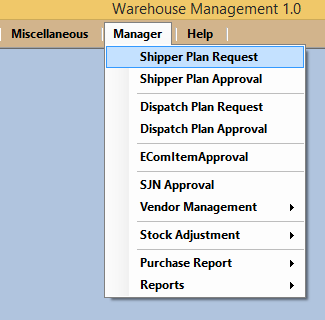
Go to Manager and Select Shipper Plan Request shown as below in picture.
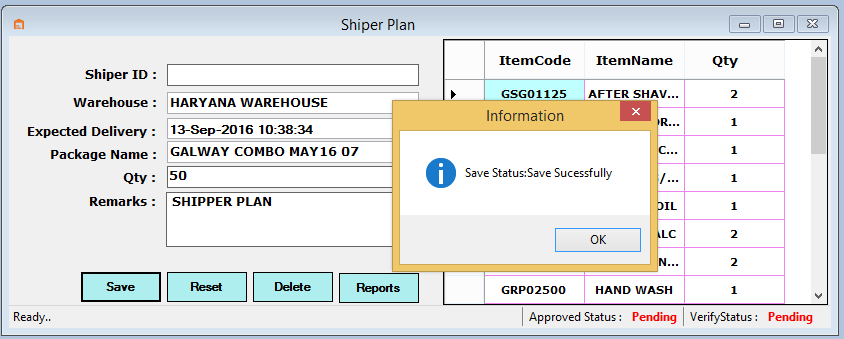
Select the Warehouse and Package Name and then load details like ItemCode, Name and Quantity in a small window.
Now enter the Quantity and Remarks then Click to SAVE button for Request shown as below Image.
Now if User want report of Shipper Plan Request then user can see.
Go to Manager and Select Shipper Plan Request and Click to Reports shown as below Image.
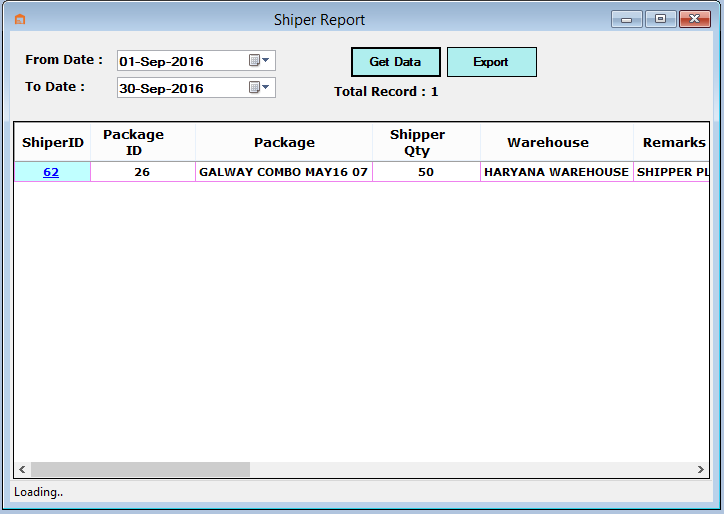
- Now user can select From Date and To date and Click to Get Data shown as below Image.